The user interface of your Learning Locker will make your study experience better and your account easier to manage. In your Learning Locker, you can view all your products, edit your account, and upgrade or extend products. This look and feel make it easier to access practice tests, review history and scores, and monitor your overall progress. You can create your own customized assessments to quiz yourself on specific areas and topics for your certification preparation.
Access to Learning Locker.
At the top of the page, there are four options:

- Tests. Displays all your products.
- Notifications Icon. Displays the unread notifications.
- Change App Icon. In case you prefer to choose another app.
- Logout.
By clicking on Tests, you will see a toolbar with the following options:
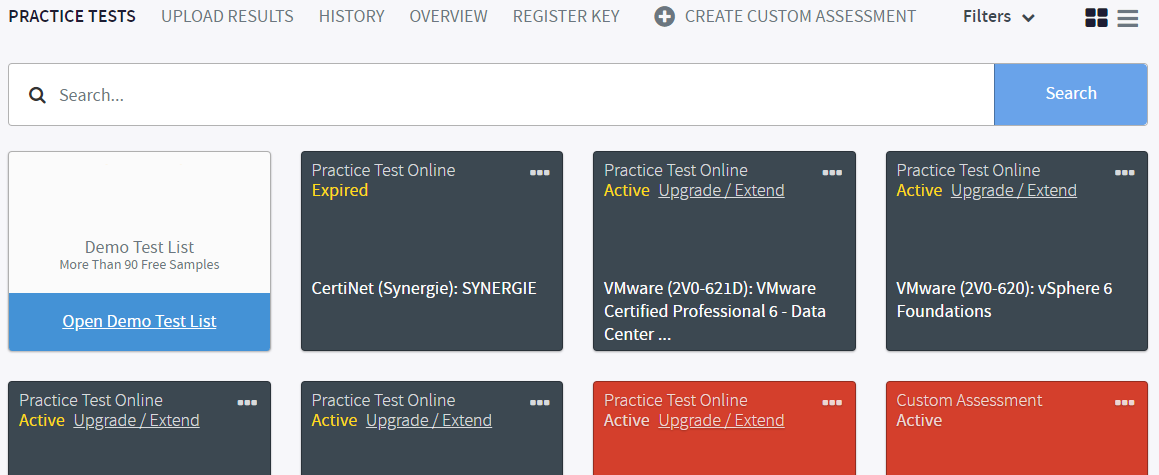
- PRACTICE TESTS: Show all your products. You may search your products by using the search toolbar or the Filters button on the right.
- UPLOAD RESULTS: Upload the results of your download (offline) test to your Learning. This feature allows you to enjoy the full functionality of the History section of your online Learning Locker.
- HISTORY: Manage your Score Reports.
- OVERVIEW: Displays information about your study history in the form of graphics.
- REGISTER KEY: It allows you to register a key.
- CREATE A CUSTOM ASSESSMENT: Create your own customized tests.
At the bottom of the page you will see the following options:

- Clear cache. Click here if you need to clear cache.
- Demos. Click here to try any of our practice tests demos.
- Support. Click here to contact our support team.
- Take a tour. Click here to know more about how the app works.
- Feedback. Click here if you need to send any feedback.
- Language. Click here to change the language of the application. Please, note that changing the interface language will change the language of the instructions and select buttons within the test experience. It will not change the language of the test content. If a test is available in another language, your provider would have to assign that resource to you.
What would you like to do next?
- Do you want to see the notifications? Click here for more info.
- Do you want to create a Custom assessment? Click here for more info.
- Do you want to try a free demo test? Click here for more info.
- Do you want to register a key? Click here for more info.
- Do you want to search for a product? Click here for more info.
- Do you want to launch a practice test or an assessment? Click here for more info.
- Do you want to hide a product? Click here for more info.