• Solutions
    • My Account
    • Learning Locker
    • Authoring Tool
    • Assessment Builder
    • Partner Portal
  • User profiles
  • Changelog
  • Platform Status
  • Downloads
  • Get PEDAGOO Today
  • Solutions
    • My Account
    • Learning Locker
    • Authoring Tool
    • Assessment Builder
    • Partner Portal
  • User profiles
  • Changelog
  • Platform Status
  • Downloads
  • Get PEDAGOO Today
home/Knowledge Base/Partner Portal/Catalog/How to send the ordered keys

How to send the ordered keys

Please, review the foundations of the topic in the How to order keys article.

When you have finished the procedure to order keys, these can be sent to the students.

Video
https://measureup.alojamientoweb.tv/wp-content/uploads/2020/06/2.-Send-key.mp4
Steps
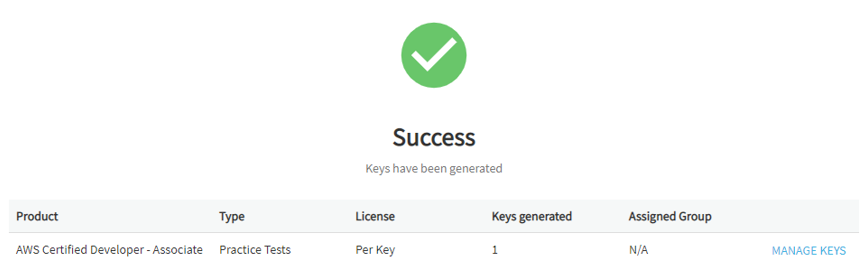
  1. Click on MANAGE KEYS.

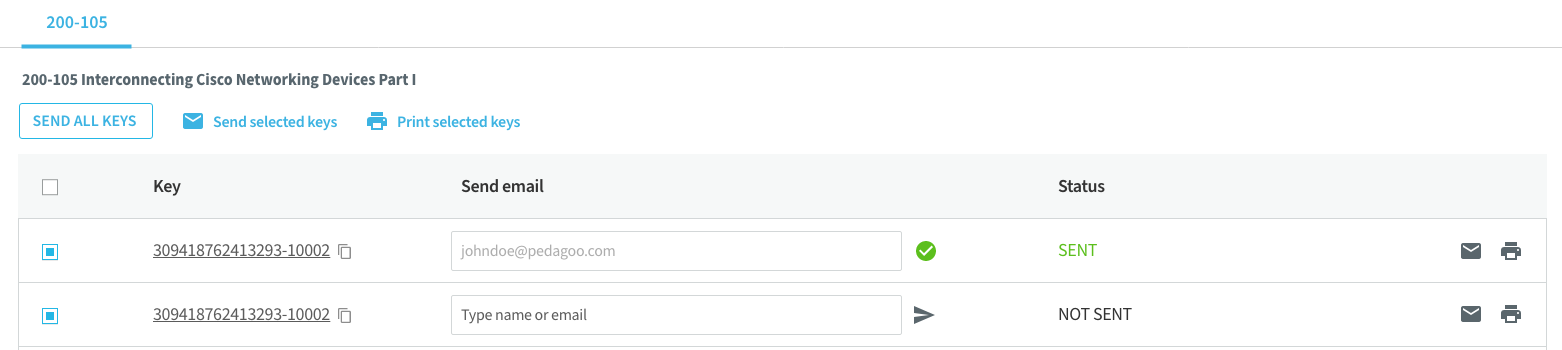
  1. To use the keys of the ordered products, you have several options:
    • To send all keys, to one or several users, click on SEND ALL KEYS.
    • To send selected keys, to one or several users, click on Send selected keys.
    • To send a key by email. Enter the email address on the Send email field next to the key, and click on Send.
    • To copy a key, click on the Copy iconĀ  located next to the key.
    • To print a key, select it and click on the Print icon located on the right.
    • To print several keys, select them and click on Print selected keys.
Note. If the SEND ALL KEYS or SEND button is deactivated you don’t have the Send keys service activated. Contact your Sales Rep.

  1. Click on FINISH.

What would you like to do next?

  • Do you want to create a new user? Click here for more info.
  • Do you want to import users? Click here for more info.
  • Do you want to create a group? Click here for more info.
  • Do you want to create a user/group report? Click here for more info.
Tags:Partner Portalsend ordered keys
Search
Categories
  • My Account
  • Learning Locker
  • Authoring Tool
  • Assessment Builder
  • Partner Portal
  • Proctoring
  • Pedagoo Website
  • Privacy Policy
  • Legal notice
  • Cookies Policy
  • Copyright 2020 Pedagoo. All Rights Reserved.

We use our and third party cookies to improve your experience and our services, and to analyse the use of our website. If you continue browsing, we take that to mean you accept their use. Read more.

ACCEPTCookie settings

Privacy & Cookies Policy

Privacy Overview

This website uses cookies to improve your experience while you navigate through the website. Out of these cookies, the cookies that are categorized as necessary are stored on your browser as they are essential for the working of basic functionalities of the website. We also use third-party cookies that help us analyze and understand how you use this website. These cookies will be stored in your browser only with your consent. You also have the option to opt-out of these cookies. But opting out of some of these cookies may have an effect on your browsing experience.
Necessary
Always Enabled
Necessary cookies are absolutely essential for the website to function properly. This category only includes cookies that ensures basic functionalities and security features of the website. These cookies do not store any personal information.
Non-necessary
Any cookies that may not be particularly necessary for the website to function and is used specifically to collect user personal data via analytics, ads, other embedded contents are termed as non-necessary cookies. It is mandatory to procure user consent prior to running these cookies on your website.
SAVE & ACCEPT
Popular Search:How to order keys, How to create a group, How to create an account and login